


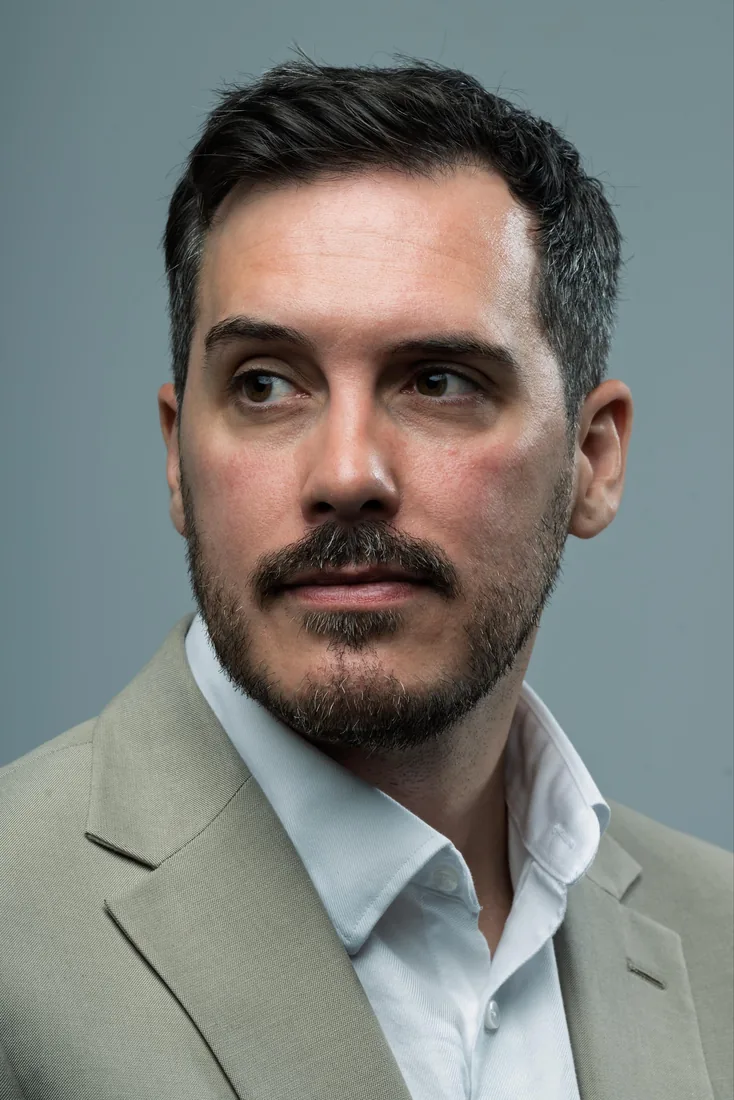
Most people choose their LinkedIn photo in about a minute, usually from whatever is already on their phone. It then sits at the top of their profile for years, making a first impression it was never really picked for. So here are the LinkedIn headshot guidelines we work to at the studio: partly LinkedIn’s own rules, partly what we’ve learned from photographing people who would rather be anywhere else than in front of a camera.
LinkedIn’s own guidance asks for a recent photo that looks like you, with your face filling most of the frame. Testing from Photofeeler points the same way: natural, lightly finished photos tend to score better on trust and competence than stylised ones. None of that strictly needs a studio. Some of it you can manage at home with a window and a patient friend, and we’ll be honest about where that works and where it doesn’t.
Your pre-shoot checklist
Run through this before you pick up a phone or book anyone. It covers what LinkedIn asks for and what tends to separate a photo people trust from one they scroll past.
- Use a photo from the last year or two, so you look the way you do when someone meets you.
- Let your face fill around 60% of the frame, which is LinkedIn’s own recommendation.
- Be alone in the picture, with nobody cropped out at the shoulder or wandering past behind you.
- Keep the background plain so nothing competes with your face.
- Match your expression and outfit to your industry. A barrister and a brand designer shouldn’t look the same.
- Choose soft, diffused light over overhead bulbs or direct flash.
- Go easy on filters and retouching. LinkedIn is clear that the photo must reflect your likeness, and over-smoothed skin tends to cost you trust.
One habit worth borrowing from a studio session: take twenty or thirty frames, not five. Small shifts in head angle and expression give you far more to choose from than you’d expect.
LinkedIn headshot guidelines for size, crop and export
The technical side is short, and missing it is the easiest way to end up with a soft or oddly cropped picture.
- Minimum size: 400 x 400 pixels
- File type: JPG, PNG or GIF
- Colour space: sRGB
- Crop: square, displayed as a circle
Treat 400 x 400 as the floor, not the target. This sizing and resolution guide makes the case for exporting larger and letting LinkedIn scale the image down, and that matches what we see: more detail survives.
Export a JPEG at roughly 80–90% quality and keep the colour profile on sRGB, because other profiles can shift skin tones once LinkedIn compresses the file. Crop centrally with some room to spare. The circular mask trims the corners, so your hairline and shoulders need a margin. Then zoom in on your own screen before uploading and look at the eyes, which is where softness shows first.
Getting the light and background right at home
Soft, even light does more for a headshot than any camera. A large, diffused source wraps around the face and avoids the hard shadows you get from ceiling lights or on-camera flash. A big window does that for free, and this general guidance on working with natural light explains why the time of day matters.
- Face a large window, with the light slightly above eye level and a little to one side.
- Stand at least a metre from the wall behind you, so your shadow doesn’t land on it.
- Pick a plain, neutral wall for a corporate look, or a softly blurred setting if you want a hint of context.
- If you wear glasses, turn your head a few degrees until the reflection goes. That’s easier than editing it out later.
If overhead lighting is all you have, hold a sheet of white card just below your chin, out of shot. It bounces light back up and fills the shadows under your eyes. The honest limit of the window method is consistency: Yorkshire daylight can change completely in the time it takes to make a coffee, so shoot quickly once it looks right.
What to wear and how to groom for the camera
Clothes photograph differently from how they look in the mirror, so plan for the lens and not the room. Mid-tone, solid colours work better than bright patterns, which distract and can shimmer once the image is compressed. A collar or neckline that frames your face helps, and minimal jewellery means nothing catches the light and pulls the eye away.
Groom as you would for an interview, and keep make-up natural. The LinkedIn thumbnail is small, and subtlety reads better at that size. We’ve written a fuller guide on what to wear for headshots if you’d like more detail on colours and fit.
Posing cues that look natural, not staged
Most people dread this part, so it’s worth saying that nobody arrives at a session knowing how to pose. In the studio that’s our job. At home, a few small adjustments do most of the work.
- Angle your shoulders slightly away from the camera and keep your eyes on the lens. It reads as more relaxed than standing square on.
- Tilt your head a few degrees off dead centre.
- Bring your chin down a touch, so you’re not looking up into the lens.
- Try a small closed-mouth smile and a fuller one. Different roles suit different registers, and you won’t know which is yours until you see both.
- Practise once with your phone, so the angles feel familiar and not forced.

The mistakes that quietly cost you views
The same few errors come up again and again, and most have a quick fix.
- Tight or awkward cropping, with the top of the head or the chin cut off. Shoot wider and crop in afterwards, never the reverse.
- Low resolution. Export well above LinkedIn’s 400 x 400 pixel minimum.
- Busy backgrounds. Use a plain wall, or step further from the background so it blurs.
- Heavy filters or over-smoothed skin. LinkedIn’s photo rules say your picture must reflect your actual likeness, so pull the retouching back.
Simply having a photo makes your profile more likely to be viewed, according to LinkedIn’s own tips, so an imperfect picture still beats a blank circle. But when a photo is badly lit, badly cropped or clearly out of date, a retake nearly always beats another round of editing.
Should you do it yourself or book a session?
It depends on how hard the photo has to work. If your profile is rarely viewed and the budget is tight, a well-lit phone photo against a plain wall, following the checklist above, is a perfectly reasonable place to start. We’d rather you did that well than paid for something you don’t need yet.
If you’re job hunting, client-facing, or the picture will also appear on a company website, the case for booking gets stronger. A session with a headshot photographer gives you controlled light, direction, and a set of frames to choose from instead of one lucky shot. Ours start at £95 for LinkedIn Express, with Quick-Fire Spotlight at £150 and the In-Depth Portrait session at £200. Actors need a different brief altogether, which we cover on our actor headshots page.
Before you book anyone, us included, ask what’s included: how many final images, how quickly they arrive, who holds the usage rights and how heavily the photographer retouches by default. Asking to see an unedited frame next to the finished version tells you most of what you need to know.
What a planned session looks like at Dock Street
We agree the brief before anyone steps in front of the camera, because a corporate set that has to match a company’s existing team photos is a different job from a warmer, more expressive profile picture. We shoot tethered into Capture One, so you see each frame on a large screen as we go and can tell us straight away what you like. There’s more on that in why we shoot tethered. Retouched images are delivered within 48 hours.
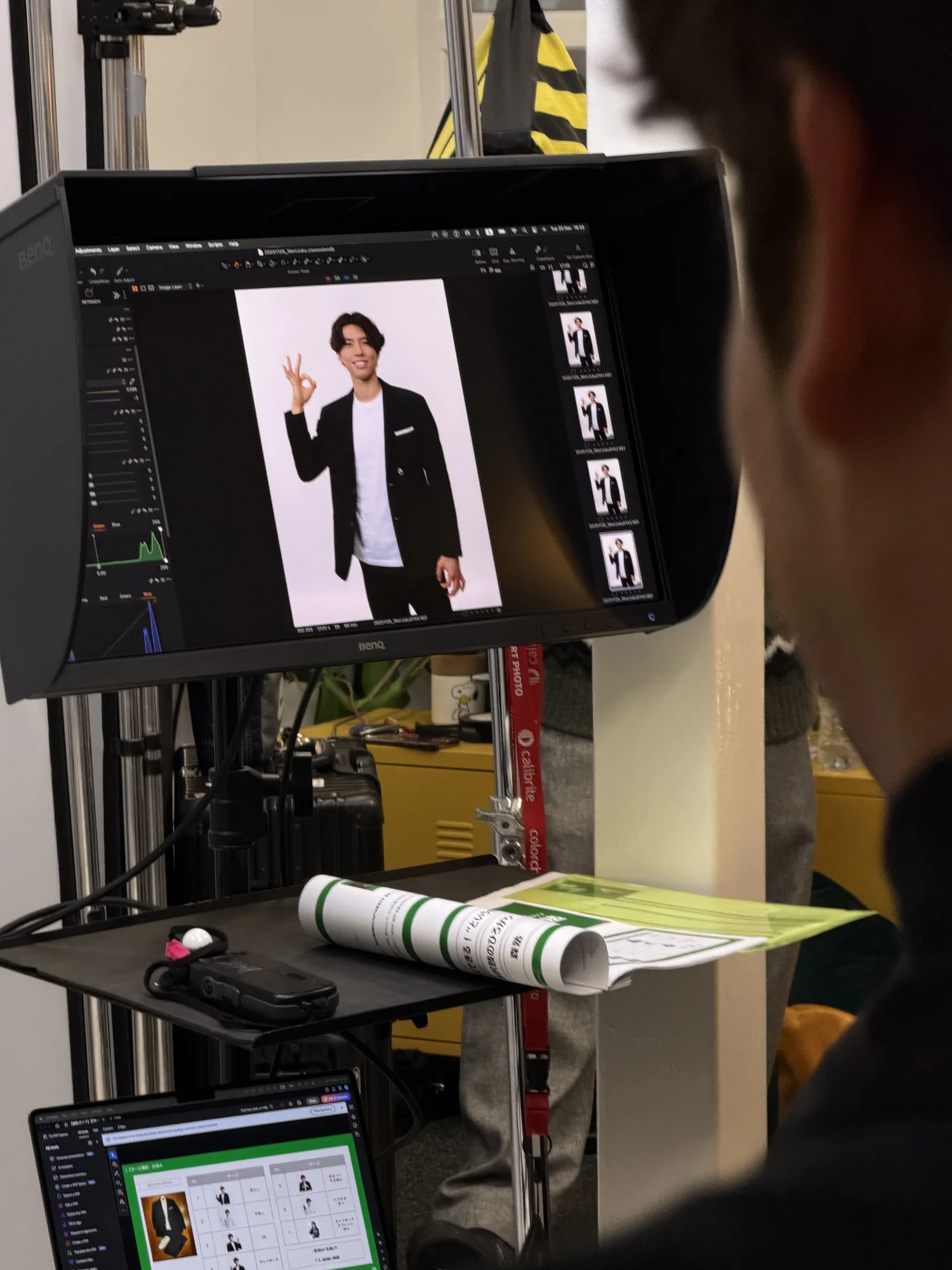
To get the most from the time, it helps to:
- Bring two or three tops in solid, mid-tone colours.
- Arrive with hair and grooming done, as studio light shows more detail than daylight.
- Tell us every place the photo will be used, since a LinkedIn crop differs from a press or casting crop.
- Mention past photos you liked or disliked. It speeds the brief up considerably.
If you’re nervous, you’re in good company. Plenty of the people in our client reviews say they arrived dreading it.
When to update your headshot
A headshot has a shelf life. If your hair, glasses, weight or general look has changed noticeably, LinkedIn’s likeness rule effectively calls for a new one. The point of the photo is recognition, not a flattering memory of five years ago.
A sensible rhythm is to review it every two to three years, or sooner if you change role or industry. A move into a client-facing or leadership position is a natural prompt, because the tone that suited a first job rarely suits a director’s profile. The aim isn’t to look aspirational. It’s to look like the person a recruiter or client will meet, so the photo and the handshake match.
How much retouching is appropriate
Some retouching is expected. Heavy retouching is where headshots lose credibility. Our own list is short: correct the colour so skin looks natural, remove temporary things such as a spot or a stray hair, and take down shine on the forehead or nose without erasing skin texture.
The test for any edit is simple. Would a colleague recognise you instantly, and does it still look like a photograph? If retouching has removed texture, changed the shape of your face or added a glow, it has gone too far. Viewers register over-smoothed skin as inauthentic even when they can’t say why.
Test your photo before you commit
Once you have a candidate, test it instead of guessing. Ask a handful of colleagues whether it looks approachable, competent and current. Feedback tools such as Photofeeler let strangers rate a photo on those traits, which is a firmer signal than one friend saying it looks fine.
Then check it where it will live. LinkedIn crops your picture into a circle and shrinks it considerably in feeds and search results, so a photo that looks sharp enlarged can lose its clarity once shrunk, particularly around the eyes. We built a LinkedIn photo checker for exactly this. Drop your photo in, position it inside the circle, and you’ll see it at the size LinkedIn shows it on a desktop profile and in the app, so you can tell whether the crop or the resolution is letting you down.
If two photos are close, run both through it and show them to a few people. We’re often the worst judges of our own faces.
Why a trusted photo beats a flattering one
The biggest misconception about a LinkedIn headshot is that it needs to impress. It doesn’t. It needs to be recognisable, current and comfortable to look at, because recruiters and clients form a judgement in seconds, and a strained or over-polished photo undermines that faster than an imperfect but real one. Nicole’s piece on what your headshot is really communicating goes deeper into how expressions are read.
If you’re choosing between frames, our guide on how to choose headshots that work harder will help. For what happens on the day, there’s the professional headshot session guide, and for prices and team options, our page on LinkedIn headshots in Leeds.
Sources and further reading
This guide draws on LinkedIn’s published tips and photo policy, a practical sizing guide and Photofeeler’s testing on what makes a photo read as trustworthy.
- 10 Tips for Taking a Professional LinkedIn Profile Photo
- Profile photo guidelines and conditions | LinkedIn Help
- LinkedIn Headshot Size and Resolution Guide
- The perfect photo (Photofeeler blog)
If you’re tidying up your wider online presence at the same time, this guide to a more professional Instagram profile applies similar thinking to another platform.
Frequently Asked Questions
What are the requirements for a LinkedIn headshot?
LinkedIn asks for a photo of at least 400 x 400 pixels in JPG, PNG or GIF format that shows your genuine likeness, not a logo, a landscape or somebody else. Beyond the technical minimum, it should be recent and your face should fill a good part of the frame.
What does a good LinkedIn headshot look like?
Your face fills around 60% of the frame, the light is soft and even, the background is simple and your expression is one a colleague would recognise. It should look like a current photograph of you, not a heavily styled or dated one.
What are the most common LinkedIn headshot mistakes?
Tight cropping, low resolution, cluttered backgrounds and editing heavy enough to change how you look. The fixes are simple: shoot wider and crop in, export large, stand in front of something plain and keep retouching light.
What is the 4-1-1 rule on LinkedIn?
It’s a guideline for what to post on LinkedIn, not a rule about your photo. If you’ve seen it mentioned alongside headshot advice, that’s a mix-up between posting habits and image specifications.
How much does a LinkedIn headshot cost in Leeds?
Our headshots start at £95 for LinkedIn Express. Quick-Fire Spotlight is £150 and the In-Depth Portrait session is £200, and retouched images are delivered within 48 hours.
Where is the studio and how do I book?
We’re at Dock Street Studio, Unit 9, 30–38 Dock Street, Leeds LS10 1JF, near Leeds Dock and a short walk from the train station, with onsite parking. You can book online, email hello@dockstreetstudioleeds.co.uk or call 0113 4400102.
Book your LinkedIn headshot in Leeds
If you’d rather hand the lighting, posing and retouching to us, we’ll talk the brief through properly over a brew and you’ll have retouched images within 48 hours. Book online, email hello@dockstreetstudioleeds.co.uk, or call 0113 4400102.
Written by Mark Wheelwright
Commercial photographer & studio owner, Leeds | ISO Photographic Ltd
Dock Street Studio, Unit 9, 30–38 Dock Street, Leeds LS10 1JF
18+ years’ experience | 900+ projects | 300+ five-star reviews | 1M+ shutter count
dockstreetstudioleeds.co.uk
Shot, written and built by the Dock Street team
Every guide on this blog comes from the team at Dock Street Studio — Mark behind the camera with 18+ years' experience, Nicole on styling and lighting, Beya on video and bookings and Austin keeping the site fast and findable. If you'd rather have us do it than read about it, book a session or explore our photography services in Leeds.