


The most reliable two person podcast setup is also the simplest: two dynamic microphones into a dual-input interface, recording each voice to its own track rather than one mixed file. That separation gives you editing control you can't get back later. An all-in-one bundle gets you there with less fuss than building a rig piece by piece, and either way the real wins come from mic placement and decent headphones — not from spending more.
We record two-person sessions in our Leeds studio most weeks, and the same handful of decisions makes or breaks them. Here's how we'd set you up, whether you're recording at a kitchen table or booking a room where it's already done for you.
Three ways to kit out a two person podcast setup
Most two-person rigs fall into one of three patterns, and the right one depends on how often you record and how much control you want over the final mix.
- Mobile — a compact two-mic option that records through a phone. Cheapest to assemble, built for interviews on the move.
- Desktop with interface — two XLR dynamic mics into a simple dual-input interface. The best balance of sound quality and per-channel control.
- Studio bundle — an all-in-one pack that arrives configured for two hosts. You trade a little flexibility for being ready in minutes.
For location work, something like the RØDE AI-Micro records two speakers through a phone with merged or split channel modes, no extra kit. A desktop rig — two dynamic mics plus a basic interface — usually costs less than one premium condenser on its own, and leaves you with separate files to tidy up afterwards. And a bundle like the Vocaster Two Studio puts the interface, two mics and two headphone outputs in one box, which suits anyone who'd rather be recording this weekend than researching compatible gear through it.
Microphone choice, placement and the 3:1 rule
In an untreated room, dynamic cardioid mics are the lower-risk option — they reject more of the room around them. Condensers reward a space with some acoustic treatment by picking up more detail, but they'll also pick up the fridge, the traffic and your co-host. A cardioid pattern hears mainly what's in front of it, which works well at a desk; hypercardioid narrows that further, useful when two mics sit close together.
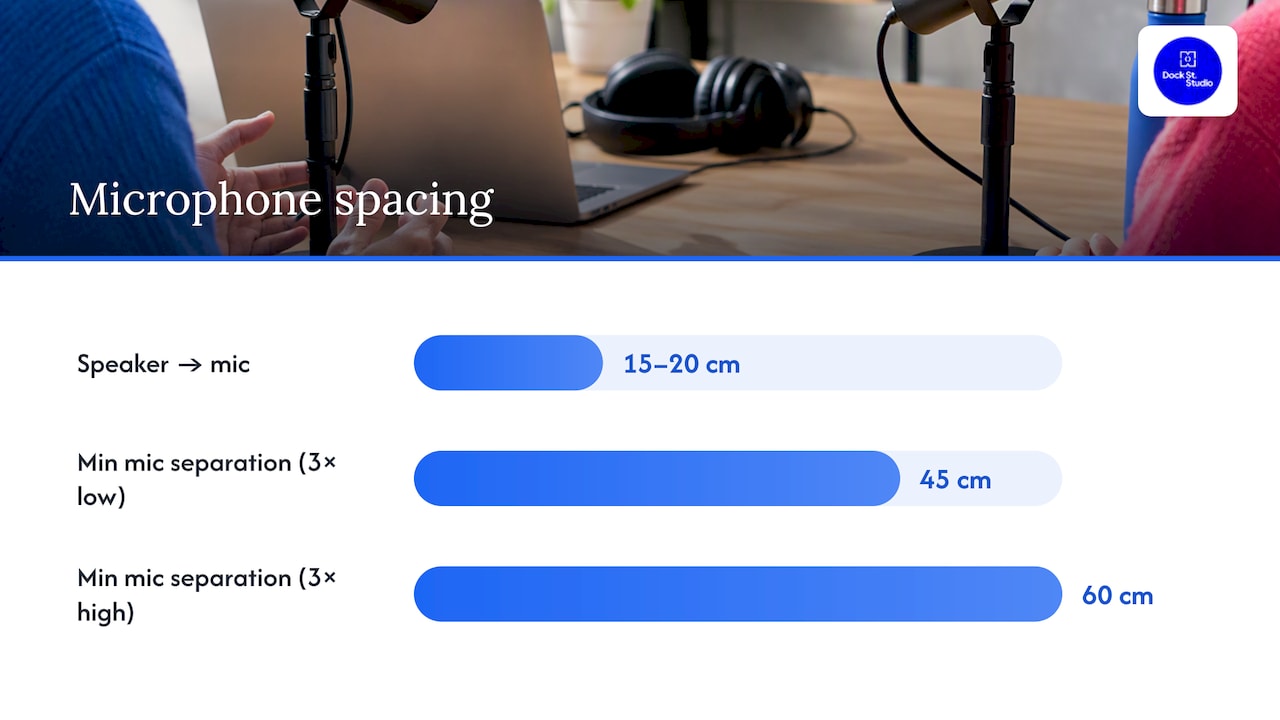
The 3:1 rule solves most bleed problems on its own: keep the second mic at least three times further from the first mic than that first mic is from its own speaker's mouth. In practice:
- Set each mic roughly 15–20cm from the speaker's mouth, angled slightly off-axis rather than straight on.
- Space the two mics at least three times that distance apart.
- On boom arms, aim each capsule away from the other speaker and away from hard surfaces like windows or monitors.
- Keep both mics at a similar height so the voices sit evenly in the mix.
Interfaces and recorders for two channels
A dedicated two-input interface is worth the modest extra cost because it captures each voice as its own file — which is what proper editing depends on. Some kit blurs the line usefully: the Shure MV7i builds an interface into the microphone body, with a second input so a co-host can plug straight in.
- Dedicated interfaces give you independent gain control and two clean mono tracks.
- All-in-one mic/interface combos cut the boxes on the desk — good if you mostly record solo with occasional guests.
- Portable recorders work well in the field, but check the model records separate tracks rather than one stereo file.
- Y-adaptors that split one input into two aren't worth it — they usually sum both voices onto one channel, and there's no separating them later.
Monitoring and headphones
Both speakers need closed-back headphones and their own volume control — a second headphone output on the interface, or a small headphone amp splitting the signal. Set up direct monitoring through the interface rather than through your recording software; software monitoring adds a delay that makes talking naturally surprisingly hard. For cueing each other, a mute button, a hand signal or one host leading the intro beats anything cleverer.
Room acoustics — and when a studio earns its keep
A spare bedroom with a wardrobe full of clothes, a rug and curtains already absorbs a surprising amount of reflection, and that kind of free treatment often matters more than upgrading microphones. Simple acoustic improvements — moving mics away from bare walls, adding soft furnishings — frequently do more for recorded quality than a pricier mic would.
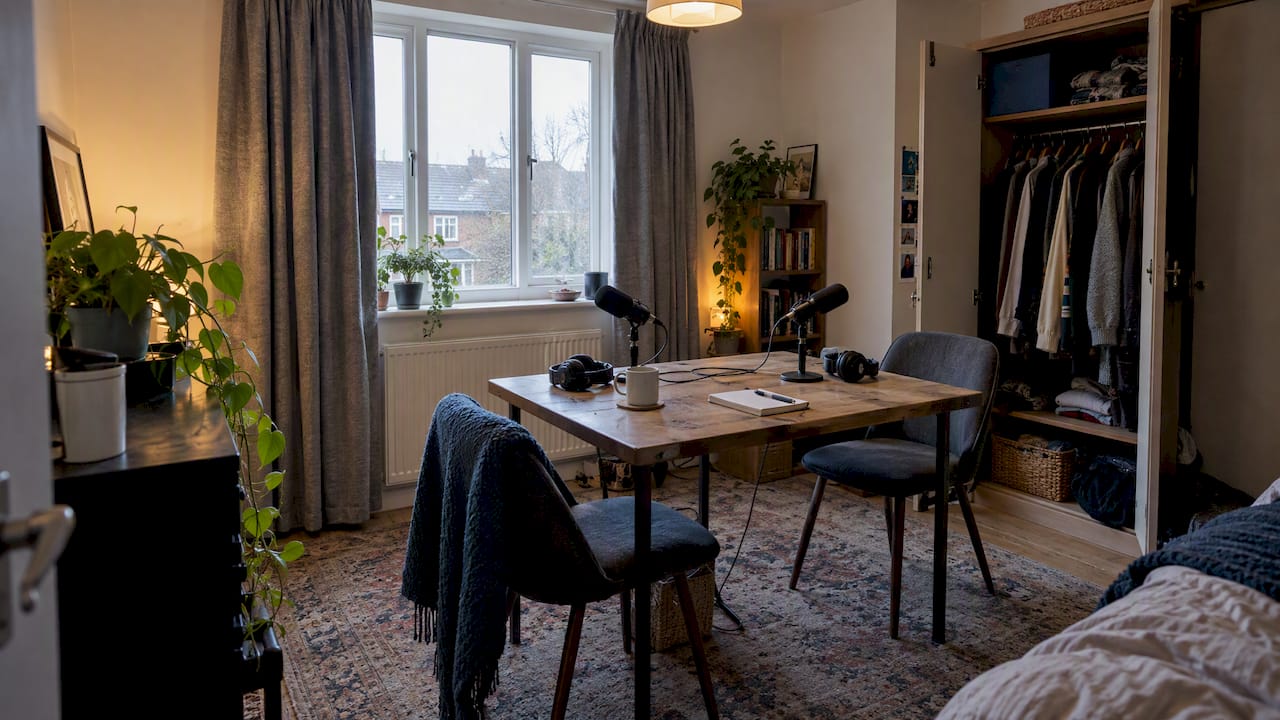
Sit both speakers facing slightly inward rather than square-on, with mics angled away from windows, screens and anything else hard and flat. Lots of glass and bare floor? A few portable foam panels behind each speaker will take the ring out of the room.
There does come a point where treating a room yourself costs more in time than it saves in money — a launch episode, say, or a guest on a tight schedule. That's where a prepared podcast studio earns its keep: the acoustics, mic positions and levels are sorted before you walk in, and your recording time goes on the conversation.
A pre-record checklist that catches most mistakes
- Connect each XLR, confirm phantom power is on for condenser mics, and check both headphone outputs are live.
- Set gain so each speaker's normal talking voice peaks around −12 to −6dB — headroom without risking clipping.
- Run a 30-second test recording, listen back on headphones, and confirm the file has saved locally and to a cloud backup.
Worth doing once: label your cables and save your gain settings as a preset, so every session starts from a known-good point rather than from scratch.
The legal bits for UK podcasters
Under UK law, performers hold specific rights over recordings of their performances — which affects how you record and publish audio featuring someone else, so get clear consent from any guest before an episode goes out. And using commercial music without a licence carries real risk; licensed libraries, bespoke tracks or royalty-free sources such as PTT Music are the safer route than dropping in a favourite song.
What studio sessions keep teaching us about two voices
The same small mistakes turn up again and again: no headphones for one speaker, a mic angled at a window instead of a mouth, no backup file when something goes wrong mid-episode. Three habits fix most of it — label the cables, save a standard gain preset, and always run a short test before the real thing.
And don't feel you need to buy everything before episode one. Start simple, record a few episodes, and adjust the kit once you know what you actually need rather than what looked impressive in a basket. If you'd rather skip the shopping entirely, our content and podcast studio in central Leeds has the mics, monitoring and an extra pair of hands ready to go — you just bring the conversation.
Frequently Asked Questions
What is the best podcast setup for two people?
Two dynamic microphones into a dual-input interface, recording each voice to its own track. It's the most reliable starting point because both voices stay editable on their own; an all-in-one bundle like the Vocaster Two Studio gets you to the same place with less assembly.
How do you do a podcast with two people?
Sit both speakers a comfortable distance apart, follow the 3:1 rule for mic spacing, and give each person their own closed-back headphones on direct monitoring. Then run a short test recording before the real one — levels, headphones, backups.
How much does a podcast with 50,000 listeners make?
There's no single figure — earnings depend on niche, ad rates and sponsorship deals far more than download numbers. Get the audio and format consistent first; a promotion guide is a useful next step once episodes are out.
What is the 3:1 rule for mics?
Place the second microphone at least three times further from the first mic than that first mic sits from its own speaker's mouth. It keeps one voice from leaking heavily into the other's track, which saves hours of cross-talk clean-up in the edit.
Do I need a licence to use music in my podcast?
Using commercial music without permission carries real legal risk, so licensed libraries or royalty-free sources are the safer choice. Performers also hold rights over their recorded performances — worth checking before you publish a guest interview.
Where is the studio and how do I book?
We're at Dock Street Studio, Unit 9, 30–38 Dock Street, Leeds LS10 1JF — central Leeds, a short walk from the train station, with onsite parking. Studio hire runs from £125 for a dry hire to £300 for a full day, with crew available if you want more than the room.
Book your podcast session in Leeds
If you'd rather spend your recording time talking than troubleshooting cables, the room's ready when you are. Book online, email mark@isophotographic.org, or call 0113 4400102.
Sources
- Vocaster Two Studio overview (Focusrite user guide)
- Performers' rights (GOV.UK)
- RØDE AI-Micro press release (Podnews)
Recommended
- Podcast Studio Hire Leeds
- Video Podcast Production: How to Set Up a Podcast Worth Watching
- Hiring a Professional Studio for Content Creation
- Studio Hire Checklist UK: What to Confirm Before You Book
Written by Mark Wheelwright
Commercial photographer & studio owner, Leeds | ISO Photographic Ltd
Dock Street Studio, Unit 9, 30–38 Dock Street, Leeds LS10 1JF
18+ years' experience | 900+ projects | 300+ five-star reviews | 1M+ shutter count
dockstreetstudioleeds.co.uk
Shot, written and built by the Dock Street team
Every guide on this blog comes from the team at Dock Street Studio — Mark behind the camera with 18+ years' experience, Nicole on styling and lighting, Beya on video and bookings and Austin keeping the site fast and findable. If you'd rather have us do it than read about it, book a session or explore our photography services in Leeds.