


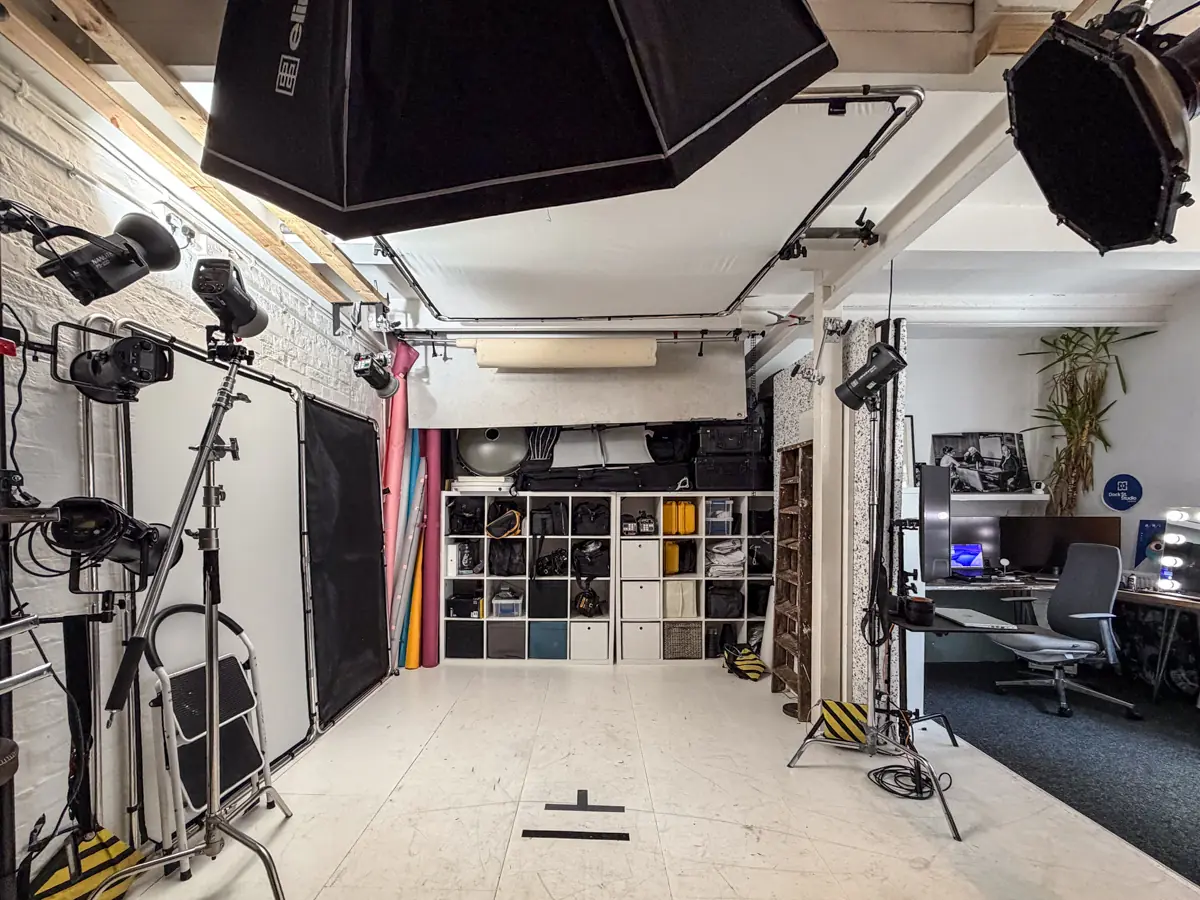
Most studio hire problems don't happen under the lights. They happen at 9:05am, when a trigger won't talk to the studio's strobes, a tether cable has the wrong end, or someone realises the only card reader is at home. This studio equipment checklist is the one we'd talk you through over a brew before a hire day at Dock Street: what to bring, what to confirm with the studio, and what to stop assuming is "probably on the rack".
The short version: bring your camera and a backup, your own triggers and spare batteries, more cards than you need and a card reader. Then ask the studio for a proper equipment list rather than a general description, and confirm power, blackout and tethering before you arrive.
Camera, capture and backup
A hire day lives or dies on the capture chain, not the lighting rig. Bring your primary body plus a backup body, or at the very least a spare lens matched to the brief. For headshots, something in the 85–135mm range compresses features flatteringly. Portraits and lifestyle work sit comfortably at 35–85mm; product close-ups want a macro or a 50–100mm.
Tethering is where shoots quietly fall apart. Confirm the studio's cable types (USB-C, USB-A or Thunderbolt), how many laptop ports are free and whether there's a screen for the client to review on. At Dock Street we shoot tethered into Capture One as standard, with the frames on a big screen in the lounge, but if you're bringing your own laptop and software, check the cable before the day.
Your media plan deserves the same care:
- Carry more cards than you think you need, formatted and labelled before the shoot starts.
- Follow the 1-2-3 rule: camera card, laptop, then a second SSD before you leave the building.
- Agree a formatting policy with any second shooter or assistant, so nobody wipes a card by mistake.
- Test the kit at home. Discovering a faulty cable with the client already in the chair is expensive.

Lighting heads and modifiers
Ask the studio directly whether they supply strobes, continuous LEDs or both, and whether the heads run on mains or battery packs. That one question shapes everything else, from recycle times to how much floor space the cabling takes.
Request modifiers by what they do rather than by brand name:
- Softboxes for a soft, wraparound light across a face or product.
- Strip boxes for a defined rim light or edge separation.
- Beauty dishes for classic, contrast-rich headshots with clean falloff.
- Grids whenever you need to keep light off the backdrop.
How many heads you need depends on the brief. A straightforward headshot session runs happily on two or three. Product and catalogue work often wants more, to cover fill, rim and background separation.
Trigger compatibility matters more than photographers expect. Studio strobes often use proprietary receivers, and a mismatched trigger can cost you the first twenty minutes of a booking. Bring your own trigger and a spare set of batteries even when the studio says it'll be fine. Testing it on arrival takes thirty seconds.
Grip, stands and safety
C-stands, boom arms, sandbags and clamps rarely make it onto a mental packing list, yet they're what actually shapes the light and keeps the set safe. A softbox on an unweighted stand near a walkway is an accident waiting to happen.
Confirm before you arrive:
- Whether cable ramps, extension leads and plug boards are provided.
- Circuit limits, particularly if you're running several high-draw heads off the same ring.
- Whether sandbags and stands are included in the hire rate or charged on top.
Route cables away from foot traffic and sandbag every stand carrying a modifier, even on a flat studio floor. If the venue's grip inventory is thin, bring your own C-stands and clamps rather than improvising with furniture and gaffer tape.
Backdrops, ceiling height and blackout
Paper rolls suit clean headshot and portrait work and tear easily if scuffed. Muslin gives texture and forgives a lot on lifestyle shoots. A cyc or infinity cove works best for full-length and product work where you need a seamless sweep from floor to wall.
Before you book, check the backdrop system the studio actually stocks (crossbars, stands and clamps), the ceiling height if you're using a cove or boom-mounted lights, whether the room can black out if daylight will interfere with your exposure, and the condition of the backdrops themselves. A scuffed paper roll shows up in every frame. It's also worth asking about a change area, a steamer and rail space for wardrobe between looks.

Small kit and consumables
The items that derail a shoot are rarely the expensive ones.
- Triggers, spare batteries, a multi-card reader, gaffer tape and lens cloths as standard.
- At least one extra SSD for a second, immediate backup beyond the laptop.
- AA/AAA batteries, cable ties, marker pen and a small first-aid kit.
- Camera-specific spares such as hot-shoe adapters and cold-shoe plates. Studios rarely stock parts matched to every camera system.
Monitoring, audio and ergonomics
A tethered screen is the minimum for client-facing work, so you're reviewing frames together rather than squinting at the back of the camera. For product and commercial jobs, colour accuracy on that screen matters; an uncalibrated laptop can make skin tones or product colours look wrong in ways that only show up on the client's monitor. Use the histogram rather than trusting the rear LCD in a dim studio.
If the day includes behind-the-scenes clips or a short interview, a single shotgun or lavalier mic, a monitoring headset and spare transmitter batteries cover most hybrid bookings. Listen for hum from continuous LED fans before you shoot anything you'll need the sound from.
On long days, a foam anti-fatigue mat at your shooting position earns its keep, and five minutes walking the floor plan before anyone starts shooting prevents the congestion that leads to knocked lights and wasted setups.
The pre-booking checklist
Run this before you confirm the booking, not on the morning of the shoot:
- Request a full equipment list with quantities of heads, modifiers and stands, not just "lighting included".
- Verify power, circuit limits, blackout capability and loading access for larger kit.
- Agree the data workflow: tether cable types, a review screen, and Wi-Fi speed if you're uploading on the day.
- Confirm the call sheet, key contacts, arrival time and what happens if an essential item fails.
- Ask whether external equipment needs PAT testing or prior approval.
Send your shot list and equipment requirements to the studio 48 hours before arrival. Most technical issues surface in that exchange, not on set where they're far more expensive to fix.
How we handle this at Dock Street Studio
Every studio hire in Leeds with us starts with a conversation about the brief, and that includes what kit you need and what's already here: lighting and modifiers are included in the hire rate, along with stands, sandbags, backdrops, a tethered workstation and the client lounge. We'll send you the full list before you confirm, and if your brief needs something unusual, say so when you book so the room is set up right when you walk in. If you're comparing options, our guide to studio hire prices in Leeds covers what's typically included and what isn't.
Frequently Asked Questions
What should be on a studio equipment checklist?
Camera bodies and a backup, tethering and cable compatibility, lighting heads and modifiers, grip (stands, sandbags, clamps), backdrops and support, and the small stuff: triggers, batteries, card reader, gaffer tape.
Does a studio provide lighting or do I bring my own?
Most studios, including ours, include lighting and modifiers in the hire, but always confirm the specific heads, mounts and trigger compatibility before booking.
How many backup cameras should I bring?
At minimum one backup body or a spare lens suited to the shoot. For paid commercial work, a full second body removes the single point of failure.
What's the safest way to back up photos on shoot day?
Card, laptop, then a separate SSD, ideally before you leave the studio rather than at home that evening.
Should I ask for an equipment list before booking?
Yes. A full list of heads, modifiers, stands and support avoids arriving to find the studio's kit doesn't match your brief. We send one as standard.
Where is the studio and how do I book?
Dock Street Studio, Unit 9, 30–38 Dock Street, Leeds LS10 1JF, a short walk from Leeds train station with onsite parking. Book online or call to talk the brief through first.
Book studio hire in Leeds
Bring your own camera kit and small items regardless, and flag anything unusual about your brief when you book. We'll make sure the room matches it. Book online, email hello@dockstreetstudioleeds.co.uk, or call 0113 4400102.
Written by Mark Wheelwright
Commercial photographer & studio owner, Leeds | ISO Photographic Ltd
Dock Street Studio, Unit 9, 30–38 Dock Street, Leeds LS10 1JF
18+ years' experience | 900+ projects | 300+ five-star reviews | 1M+ shutter count
dockstreetstudioleeds.co.uk
Shot, written and built by the Dock Street team
Every guide on this blog comes from the team at Dock Street Studio — Mark behind the camera with 18+ years' experience, Nicole on styling and lighting, Beya on video and bookings and Austin keeping the site fast and findable. If you'd rather have us do it than read about it, book a session or explore our photography services in Leeds.