


If you're planning a livestream — a product launch, a hybrid event, a podcast with a remote guest — someone will eventually ask whether the feed should run over RTMP or SRT. It sounds like a question for the IT department, but it quietly decides whether your stream rides out a wobbly connection or freezes in front of an audience.
Live feeds come up a lot in studio hire in Leeds, so we've had plenty of chances to watch both protocols behave — and misbehave. The short version: use SRT wherever the network is out of your control, and keep RTMP (or its encrypted cousin RTMPS) as the fallback for destinations that don't accept it. Here's the why behind that, without the jargon.
What RTMP does well — and where it falls over
RTMP has been around since the Flash era, and it has stuck around because almost everything supports it. According to Wowza's comparison of the two protocols, it remains the industry standard for compatibility, with nearly every encoder, software package and streaming platform accepting it natively.
The catch is how it copes when the network misbehaves. RTMP runs over TCP, which insists that every packet arrives, in order, before playback continues. On a stable wired connection that's fine. On anything less, a single lost packet can stall the whole stream, and RTMP has no built-in way to recover gracefully — it buffers, stutters or drops outright. RTMPS wraps the stream in TLS so it travels encrypted, but it doesn't change that loss behaviour.
Why SRT copes better with unreliable networks
SRT (Secure Reliable Transport) approaches the problem from the other direction. It runs over UDP, then adds its own retransmission layer: recent packets sit in a configurable latency buffer, so anything lost in transit can be requested again and slotted back into place before playback catches up. As Mux's guide to streaming with SRT explains, it also carries AES encryption as standard rather than as a bolt-on.
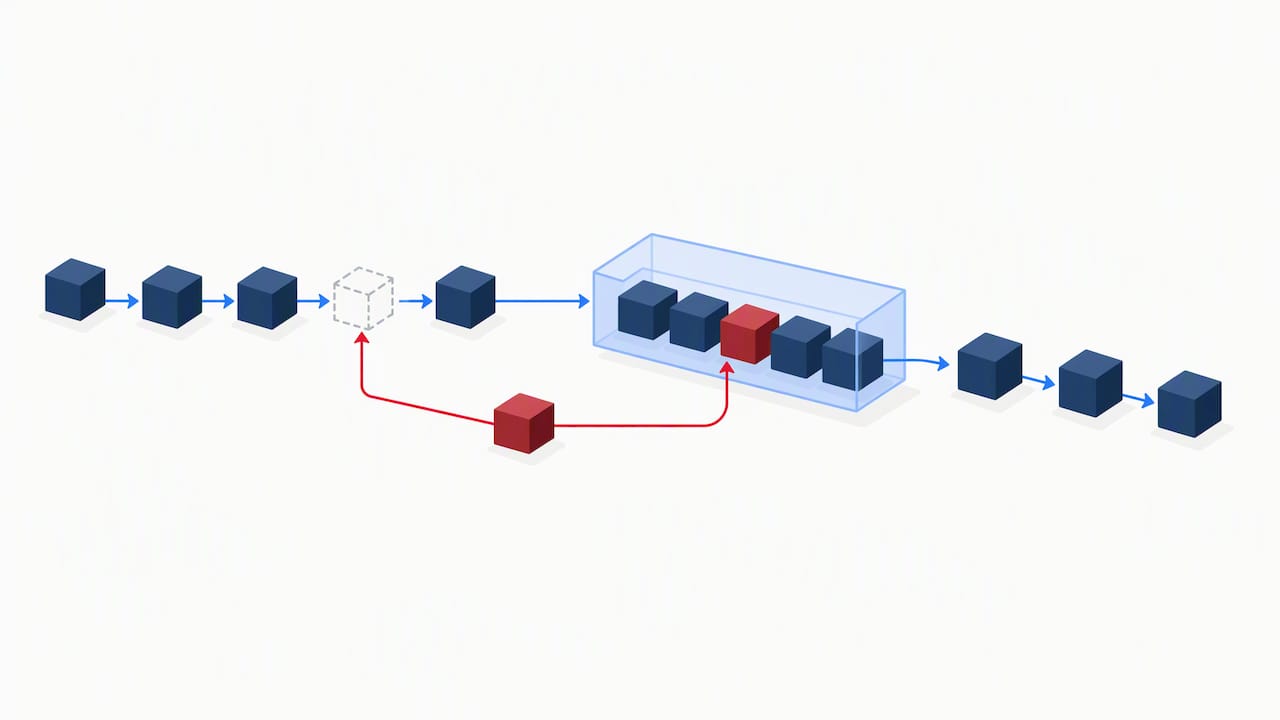
That buffer is the whole trick. You trade a small amount of delay — a few hundred milliseconds to a couple of seconds — for a stream that recovers from drop-outs instead of freezing. By design, RTMP's TCP foundation stalls and can disconnect on packet loss, while SRT's UDP-plus-retransmit model recovers within its buffer. For a presenter on 4G or a remote guest on hotel Wi-Fi, that trade is nearly always worth making.
So which one should you use?
Honest answer: it depends on three things — the network, the latency you can absorb, and what your destination accepts. Neither protocol is automatically better.
On cellular, public Wi-Fi or any unmanaged internet link, choose SRT; if your production can absorb an extra second or so, the buffer is a small price for a stream that stays up. A fully wired, in-studio setup on a managed connection can run RTMPS all day without drama. The deciding factor is often compatibility: SRT support is growing but not universal, and plenty of platforms still expect RTMP-only ingest. Google's YouTube ingestion documentation confirms RTMPS as a supported secure ingest option using port 443, which makes it a solid, lower-risk fallback when SRT isn't available end to end. And if your platform lacks SRT ingest entirely, a relay lets you keep SRT for the fragile first leg and hand off to RTMP for the last mile.
Setting up SRT in OBS
OBS Studio supports SRT natively, so the setup is shorter than the acronyms suggest. In Settings, then Stream, choose "Custom" and enter your destination as an srt:// URL with the host, port and mode, then append parameters such as latency (in milliseconds) separated by ampersands. Caller mode connects out to a known server, listener mode waits for the far end to connect to you, and rendezvous lets both sides meet in the middle when each sits behind a restrictive NAT, as the SRT Alliance's deployment guide recommends.
One known wrinkle: if OBS reports that it cannot recreate a listener socket on reconnect during an active stream, stop the output completely, wait a few seconds for the socket to release, then restart — rather than trying to reconnect mid-stream while everyone watches the spinner.
Whichever protocol you land on, run a short test stream the day before and keep an eye on the packet-loss and bitrate stats. It catches most problems while there's still time to fix them.
What studio hire in Leeds solves for a livestream
We'd rather debug sockets before you arrive than while an audience waits. Ahead of any livestream or hybrid shoot at Dock Street, we test the connection path, set a latency buffer suited to the job, and configure a fallback target alongside the primary feed — so a dropped connection never means a dropped show. If you want to see how the pieces fit together across several platforms at once, we've written up our tested multi-platform streaming workflow.
And if you'd rather not own any of this yourself, our studio hire comes with the network and encoder setup already proven, and the content studio is built for podcast and video days where the stream is only one part of the job. Bring us the brief and a couple of examples you like, and we can talk the setup through properly over a brew.
Frequently Asked Questions
Is RTMP UDP or TCP?
RTMP runs over TCP, which guarantees packets arrive in order but has no tolerance for packet loss. That's the main reason it stalls or disconnects on unreliable networks, unlike UDP-based protocols such as SRT.
What is an SRT encoder?
An SRT encoder is any hardware or software encoder that can output a stream using the SRT protocol, which adds retransmission and AES encryption on top of a standard UDP connection. Most modern encoders and tools like OBS Studio support SRT natively, accepting an srt:// destination URL with mode and latency parameters.
What is the difference between WebRTC and SRT?
WebRTC is built for sub-second, interactive latency — video calls, essentially — while SRT is built for reliable contribution with a configurable latency buffer that usually runs higher than WebRTC but recovers more predictably from packet loss. The right choice depends on whether your priority is the lowest possible latency or resilience on unreliable links.
When should I still use RTMP instead of SRT?
Use RTMP, or RTMPS for an encrypted connection, when your destination platform or encoder doesn't support SRT ingest. Google's YouTube ingestion documentation confirms RTMPS as a supported secure ingest option using port 443, which makes it a solid fallback when SRT isn't available end to end.
Can I run a livestream from your studio in Leeds?
Yes. We're at Unit 9, 30–38 Dock Street, Leeds LS10 1JF — a short walk from Leeds train station, with onsite parking. We test the connection path, encoder and fallback before you arrive, so you turn up and present rather than troubleshoot. Booking is online, by email or by phone.
Sources
- RTMP vs SRT: Choosing the right protocol (Wowza)
- Use SRT to live stream (Mux docs)
- Nuuo
- Delivering live YouTube content via RTMPS (Google Developers)
- OBS forum thread: SRT media source cannot recreate listener socket (practical repro/workaround)
Book your livestream session in Leeds
If you're planning a stream and would rather have the technical side handled before you walk in, we can help. Book online, email mark@isophotographic.org, or call 0113 4400102.
Written by Mark Wheelwright
Commercial photographer & studio owner, Leeds | ISO Photographic Ltd
Dock Street Studio, Unit 9, 30–38 Dock Street, Leeds LS10 1JF
18+ years' experience | 900+ projects | 300+ five-star reviews | 1M+ shutter count
dockstreetstudioleeds.co.uk
Shot, written and built by the Dock Street team
Every guide on this blog comes from the team at Dock Street Studio — Mark behind the camera with 18+ years' experience, Nicole on styling and lighting, Beya on video and bookings and Austin keeping the site fast and findable. If you'd rather have us do it than read about it, book a session or explore our photography services in Leeds.