


Tethered shooting means the camera is connected to a computer while we photograph, so every frame appears full size on a big screen the moment the shutter fires. Nobody squints at a three-inch display or takes it on trust that the eyes are sharp. At our photography studio in Leeds we shoot tethered into Capture One on every session, so you see your pictures as they happen and leave knowing what you've got.
That's the short answer. Below we explain how the link works, what can go wrong with cables and wireless, and what it changes for you if you're the one in front of the lens — whether that's a LinkedIn portrait, a product range or a day hiring the space for your own shoot.
What does tethered shooting actually mean?
Tethering (you'll also hear "tethered capture") is connecting a camera to a computer, tablet or phone, by cable or a wireless app, so each new image is passed straight across and saved to a folder you choose. Digital Photography School's step-by-step guide puts it well: the software usually does more than receive files, and can change camera settings and trigger the shutter remotely too.
The name comes from the cable — the tether — that links the two. Nothing about the photography itself changes. Same lens, same light, same person. What changes is where the picture goes and who gets to see it.
If you've ever had a photographer turn the camera round to show you a frame, tethering is the grown-up version of that moment. Everyone looks at the same large, colour-managed screen instead of leaning over a tiny one.
Why do photographers shoot tethered?
You see the real image, not a thumbnail
Detail is the main reason. PetaPixel points out that a typical 3.2-inch camera screen shows roughly 1 megapixel, while the camera is capturing 20 to 40. That gap hides soft focus, half-blinks and patchy exposure. Fstoppers adds that the back of the camera only shows a JPEG preview with the camera's own settings baked in, whereas a tethered screen shows the full-size file in real time.
On a headshot, that's the difference between "the eyes look fine" and knowing they're sharp. On a product, it's spotting a stray reflection now rather than discovering it in the edit.
Review, rate and adjust while you're still set up
Adorama's learning centre sums up the benefits as a bigger screen, rating images straight away, and correcting camera and lighting settings in real time. B&H's introduction adds tidier file organisation (no card download afterwards), remote control of a camera that's awkward to reach, and clients and assistants all looking at the same thing.
One look, applied to every frame
You can also set up a single frame early — white balance, crop, exposure — and have those adjustments applied to everything that follows. So you're looking at something close to the finished picture rather than a flat raw file. In a studio, where the light stays put, that makes a session feel decisive: we agree the look early, then check it on every frame.
Everyone agrees in the room
For brands and marketing teams, the real value is shared judgement. The photographer, a brand manager and an art director can look at one frame together and say yes, rather than finding out three days later that the angle was wrong. We go into how this plays out day to day in why we shoot tethered at Dock Street Studio.
How does a tethered setup work?
The steps depend on the software. The two you'll meet most are Adobe Lightroom and Capture One, which is what we use.
Tethering to a laptop with Lightroom
Adobe's Lightroom documentation sets out the sequence:
- Connect a compatible camera to the computer with a USB cable and open Lightroom.
- Choose Tethered capture in the Connected camera dialog.
- Set the session name, file naming, destination folder, presets and metadata.
- Turn on Live View in the Camera panel if you want to compose on screen.
- Shoot, and review the photos in the filmstrip.
Where it goes wrong: a camera that isn't on the supported list simply won't connect, and saving to a slow or nearly full drive makes every frame lag. Setting up names and presets before the first frame is what keeps a long day organised.
Tethering with Capture One
Capture One is the studio standard for good reason. Its tethered capture overview explains that photos import straight into a Session or Catalog on the hard drive, so there's no memory-card import at all. Its own top tips for tethered shooting are refreshingly practical:
- In Preferences, on the Capture tab, tick only your camera brand — each manufacturer's toolkit can interfere with the others.
- Use a reliable USB cable of 5 metres or less, dropping to 3 metres if you have problems.
- Save to a fast drive, ideally an SSD, and work in a Session rather than a Catalog for most shoots.
One quirk catches people out. As PetaPixel notes, Capture One writes images straight to the computer rather than the card, so they don't appear on the camera's own screen. That's deliberate — it gets the picture onto the big screen as quickly as possible.
Live View for composing on screen
Live View shows what the camera sees on the computer in real time, which is handy for precise framing and product layouts. Capture One's Live View workflow notes describe it as built for studio use and warn it can overexpose outdoors or when pointed at a bright light. It's another reason tethering and studios get on so well: steady, controlled light gives the software a stable picture to work with.
Does the tethering cable really matter?
Yes, more than most people expect. A tether is only as dependable as its weakest link, and a dropped connection mid-session costs time and momentum. Capture One's advice is to keep USB tether cables to about 5 metres for speed and reliability, try 3 metres if things play up, and use a powered hub, an active extension or a cable guard so the plug can't be tugged out of the camera.

High-end medium-format backs are more particular still. Phase One's support pages say the IQ4 connects with a supplied 3 metre USB-C cable, or over Gigabit Ethernet on Category 6a cable up to 90 metres. The lesson either way: "any USB-C cable will do" isn't a safe assumption when the files are big.
Is wireless tethering as good as a cable?
It's convenient, but slower with big files. Testing a wireless tethering system, Fstoppers found a 24.3MP raw file took about 10 seconds to arrive against roughly 3 seconds over a cable, and the connection dropped at least once per shoot. The reviewer's conclusion was that wired is the safer choice when every frame counts.
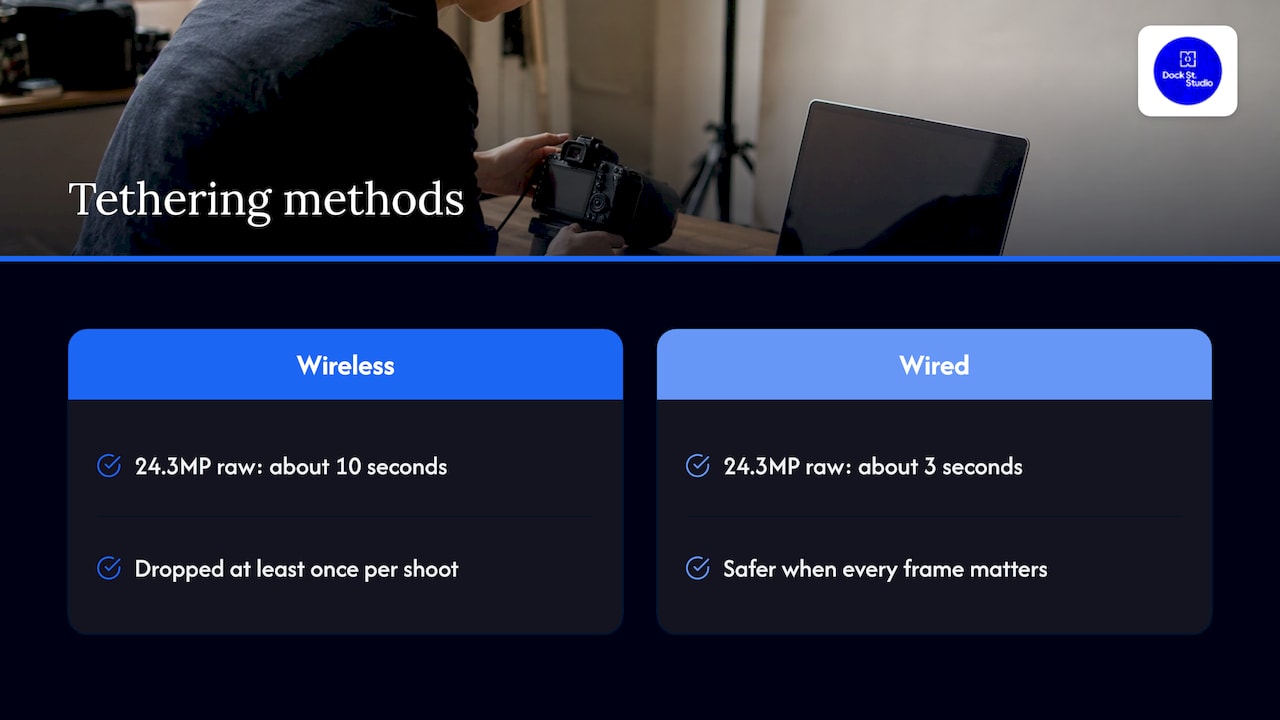
That's our view too. Wireless is fine for a casual check from across the room, but when someone has booked a slot, a cable is what holds the session together.
Can you tether to an iPad?
Yes. The Capture One user guide describes the Capture Pilot app, which links Capture One to an iPad or iPhone so you can show, rate and even capture images remotely, plus a web option so colleagues can view and rate from a browser. Useful when a client wants to follow along from the other side of the set.
What does tethering change on your shoot?
The technical side is our job. What matters to you is how it changes the experience.
Headshots for professionals and actors
When you can see each frame land, you can tell which expression is working and when we've got the shot — no guessing, no "I'm sure it'll be fine". It's part of every session when you book headshots in Leeds with us, from £95 for LinkedIn Express to £150 for Quick-Fire Spotlight and £200 for an In-Depth Portrait.
If you're nervous in front of a camera (most people are), don't feel you need to watch every frame. PetaPixel's author suggests reviewing every 10 to 20 frames rather than after each click, and that's roughly how we pace it: shoot, glance at the screen together, adjust, carry on. Seeing a good frame early does more for confidence than any amount of reassurance from us.
Products and e-commerce
Product work is where tethering really earns its keep. A scratch on a surface, a label a few degrees off or a reflection in glass is obvious at full size and easy to miss on the camera. If you're planning product photography Leeds customers will see on your shop and socials, being able to sign off each angle on screen saves a lot of back-and-forth later.
Hiring the studio for your own shoot
If you're booking photography studio hire in Leeds to shoot your own content, bring a laptop and a decent cable and tether into it. Checking lighting and framing on a big screen before you commit to a set-up is the easiest way to avoid a reshoot. Studio hire starts from £125.
A note on pace
A big screen invites opinions, and with several people watching, one frame can attract more discussion than it deserves. Fstoppers' pros and cons piece makes the fair point that tethering should suit the shoot. Planning is the fix: we agree the brief and shot list beforehand, so the screen confirms the plan instead of reopening it.
Frequently Asked Questions
What is tethered shooting?
It's shooting with the camera connected to a computer, so each photo is saved straight to the computer and shown full size the moment it's taken. The software can usually change camera settings and fire the shutter too.
Can I shoot tethered with Lightroom?
Yes, if your camera is on Adobe's supported list. Connect it by USB, choose Tethered capture in the Connected camera dialog, set your session name and folder, then shoot and review in the filmstrip. Check compatibility before the day, not on it.
Can I use any USB-C cable to tether a camera?
Not reliably. Length and build quality both matter, and Capture One recommends keeping USB cables to 5 metres or less, or 3 metres if the connection drops. A powered hub or active extension helps over longer runs.
Is wireless tethering good enough for a paid shoot?
For a quick check from across the room, it can be. For a booked session where every frame matters, a cable is faster and far less likely to drop out, which is why we stay wired in the studio.
Does tethering slow a shoot down?
Not if it's planned. Looking at the screen in batches rather than after every frame keeps the session moving, and an agreed shot list means the screen confirms decisions instead of reopening them.
Where is the studio?
Dock Street Studio is at Unit 9, 30–38 Dock Street, Leeds LS10 1JF, in central Leeds near Leeds Dock. There's onsite parking, and it's a short walk from Leeds train station.
Sources
- Tethered Photography: A Step-By-Step Guide, Digital Photography School
- Preview While You Shoot, Adorama Learning Center
- Tethered Shooting Basics for Studio Photography, B&H eXplora
- Shooting Tethered Pays Off, PetaPixel
- Why Do Studio Photographers Love Tethering?, Fstoppers
- The Pros and Cons of Shooting Tethered, Fstoppers
- Using Tether Tools Air Direct Wireless Tethering System, Fstoppers
- Capture photos with tethered capture in Lightroom, Adobe
- Top tips for tethered shooting, Capture One
- Tethered capture overview, Capture One Support
- Live View workflow overview, Capture One Support
- Setting up Phase One Equipment, Phase One Support
- User Guide for Capture One 11 and Capture Pilot
See your pictures as we shoot them
If you'd like a session where you can see every frame on screen and talk it through as we go, tell us what the pictures need to do and we'll plan it with you over a brew. Headshots start from £95 and studio hire from £125. Book online, email mark@isophotographic.org, or call 0113 4400102.
Written by Mark Wheelwright
Commercial photographer & studio owner, Leeds | ISO Photographic Ltd
Dock Street Studio, Unit 9, 30–38 Dock Street, Leeds LS10 1JF
18+ years' experience | 900+ projects | 300+ five-star reviews | 1M+ shutter count
dockstreetstudioleeds.co.uk
Shot, written and built by the Dock Street team
Every guide on this blog comes from the team at Dock Street Studio — Mark behind the camera with 18+ years' experience, Nicole on styling and lighting, Beya on video and bookings and Austin keeping the site fast and findable. If you'd rather have us do it than read about it, book a session or explore our photography services in Leeds.